
How to Become a Virtual Assistant in the Philippines: A Practical Beginner’s Guide for 2026

So, you want to become a virtual assistant.
Maybe you saw someone working from home with a laptop. Maybe a friend told you about VA work. Maybe you’re tired of commuting every day, looking for additional income, or simply wondering if your current skills can earn you money online.
Then you start searching:
How do I become a virtual assistant in the Philippines?
And suddenly you see hundreds of videos, courses, Facebook posts, job listings, and people telling you that you need to master everything from Canva to bookkeeping before you can even apply.
You don’t.
If you’re a beginner, becoming a virtual assistant is much simpler when you stop thinking about becoming a “perfect VA” and start thinking about one question:
What useful problem can I solve for a client?
That’s where I would start.
This guide explains what a Filipino virtual assistant actually does, what you need to learn, what equipment you need, how to create a portfolio even without experience, and how to start looking for your first client.
What Is a Virtual Assistant?
A virtual assistant, or VA, is someone who helps a business, entrepreneur, professional, or organization complete tasks remotely.
You could be working from your home in Manila, Cebu, Davao, Laguna, Iloilo, or anywhere else in the Philippines while your client is in Australia, the United States, Canada, the United Kingdom, or somewhere completely different.
You communicate online and complete work using digital tools.
The job can include things like:
- managing emails
- scheduling meetings
- updating spreadsheets
- researching information
- creating reports
- answering customer inquiries
- preparing Canva graphics
- managing social media
- updating websites
- organizing files
- entering data
- updating CRM records
- assisting with e-commerce stores
- preparing invoices
- coordinating appointments
But here’s something beginners should understand:
“Virtual assistant” is not one specific job.
It’s an umbrella term.
One VA might spend most of the day answering emails.
Another might manage an Amazon or Shopify store.
Another might work exclusively with real estate agents.
Another could be editing videos, scheduling social media posts, or organizing an executive’s calendar.
That’s why you don’t have to learn everything.
You need to figure out what kind of problems you can solve.
Yes.
But “no experience” doesn’t necessarily mean “no skills.”
This is something many beginners overlook.
You may never have worked under the official title Virtual Assistant, but think about what you’ve already done.
Have you ever:
- prepared reports in Microsoft Word?
- organized data in Excel?
- answered emails professionally?
- handled customers?
- created PowerPoint presentations?
- used Canva?
- scheduled meetings?
- managed Facebook pages?
- researched information online?
- organized files?
- prepared documents?
- answered phone calls?
- handled administrative work?
Those are transferable skills.
A teacher, office employee, student, customer-service representative, salesperson, administrative assistant, business owner, or BPO employee may already have skills that can be transferred into VA work.
So instead of saying:
“I don’t have VA experience.”
Ask:
“What can I already do that a business owner might need?”
That question gives you somewhere to start.
Let’s make this practical.
Imagine a small business owner has 150 unread emails, three meetings tomorrow, customer inquiries waiting for replies, an Excel file that hasn’t been updated, and social media posts that still need to be scheduled.
That person doesn’t necessarily need another manager.
They need someone reliable who can take some of those tasks off their plate.
That’s where a VA comes in.
Your work might look like this:
8:00 AM: Check email and flag important messages.
8:30 AM: Update the client’s calendar.
9:00 AM: Prepare information for an upcoming meeting.
10:00 AM: Update customer records in a CRM.
11:00 AM: Research competitors.
1:00 PM: Schedule social media posts.
2:00 PM: Update a spreadsheet.
3:00 PM: Send the client a short progress report.
Another VA could have a completely different day.
That’s why the best place to begin isn’t asking:
“What should every VA know?”
Instead, ask:
“What type of VA work fits the skills I already have?”
One of the biggest mistakes I see in beginner VA advice is the idea that you need to learn 20 different tools immediately.
You don’t.
Start with one direction.
Here are some common options.
General Virtual Assistant
This is often a practical choice for beginners.
Common tasks include:
- email management
- calendar management
- research
- data entry
- document preparation
- spreadsheets
- file organization
- meeting coordination
If you already have office or administrative experience, this may feel familiar.
Social Media Virtual Assistant
If you enjoy content and design, you might help businesses with:
- Canva graphics
- content calendars
- scheduling posts
- writing simple captions
- responding to comments
- organizing content ideas
- checking basic analytics
You don’t have to be an influencer.
You need to understand how to support someone’s social media workflow.
E-commerce Virtual Assistant
Online sellers often need help with repetitive operational tasks.
You could assist with:
- product listings
- product descriptions
- inventory records
- customer inquiries
- order tracking
- product research
- spreadsheet updates
This type of work can eventually lead to more specialized roles.
Real Estate Virtual Assistant
Real estate professionals frequently handle many leads, appointments, documents, and follow-ups.
A VA might assist with:
- CRM updates
- lead organization
- appointment scheduling
- online research
- document management
- email follow-ups
- listing coordination
Executive Virtual Assistant
An executive VA usually handles more complex responsibilities.
Tasks may include:
- inbox management
- calendar management
- meeting preparation
- travel research
- documentation
- project coordination
- follow-ups
- reporting
These roles often require stronger communication, organization, and judgment.
Specialized Virtual Assistant
Later, you may choose to specialize in areas such as:
- bookkeeping
- SEO
- digital marketing
- podcast management
- video editing
- email marketing
- graphic design
- website management
- automation
- project management
Specialization can come later.
Your first job does not have to determine your entire career.
Open a document and create three columns.
Column 1: Tools I Know
For example:
- Microsoft Word
- Microsoft Excel
- Google Docs
- Google Sheets
- Canva
- Gmail
- Google Calendar
- Zoom
- Google Meet
- ChatGPT
Column 2: Tasks I Can Do
For example:
- write emails
- organize files
- research online
- create presentations
- make simple graphics
- update spreadsheets
- answer customer questions
- prepare reports
- schedule appointments
Column 3: Things I Need to Improve
Maybe:
- Excel formulas
- professional English
- Canva
- calendar management
- CRM software
- client communication
Now you have something much more useful than saying:
“I want to become a VA, but I don’t know where to start.”
You have a starting point.
Don’t collect skills just because they’re popular on TikTok or Facebook.
Learn skills connected to actual business problems.
For a beginner, I would prioritize these.
Professional Email Communication
You don’t need flowery English.
In fact, international clients often prefer messages that are simple and clear.
Instead of writing:
“Good day, Sir. I would like to humbly inform you regarding the aforementioned task…”
You can write:
“Hi John, I’ve finished the spreadsheet update. I found three records with missing information, so I marked them for review.”
Short.
Clear.
Professional.
That’s usually better.
Google Workspace
Learn the basics of:
- Google Docs
- Google Sheets
- Google Drive
- Gmail
- Google Calendar
You don’t have to become an expert immediately.
Know how to create, organize, edit, share, and collaborate.
Online Research
Clients often ask questions like:
“Find ten competitors.”
“Research five software options.”
“Create a list of potential suppliers.”
“Compare these companies.”
Good research isn’t just copying links.
A useful VA knows how to organize information so the client can make a decision quickly.
Spreadsheet Skills
You don’t have to become an Excel wizard on Day 1.
But learn how to:
- organize data
- sort information
- filter rows
- format tables
- use basic formulas
- maintain clean records
These skills are useful across many VA roles.
Calendar Management
This sounds easy until you’re coordinating people across different countries.
Learn:
- time zones
- meeting invitations
- recurring meetings
- reminders
- rescheduling
- calendar conflicts
A 9:00 AM meeting for your client might happen at night in the Philippines.
Time-zone awareness becomes part of the job.
Client Communication
This is one of the most valuable VA skills.
A reliable VA doesn’t disappear when something goes wrong.
For example:
Don’t wait until the deadline to say:
“I wasn’t able to finish it.”
Tell the client earlier:
“I’m still waiting for access to the file. Once I receive it, I can continue the task. If access isn’t available today, the deadline may need to move.”
That kind of communication builds trust.
AI tools are now part of remote work.
You may use tools such as ChatGPT, Claude, Gemini, or other AI platforms to help with:
- brainstorming
- summarizing information
- drafting emails
- creating outlines
- organizing research
- rewriting text
- generating ideas
- preparing templates
But AI should make you more capable, not careless.
If a client asks you to research something and you paste the first AI response you receive without checking it, that’s risky.
Your responsibility is still to:
- verify important information
- check names and numbers
- review grammar
- understand the context
- protect confidential client information
- make sure the result actually solves the client’s problem
The valuable VA of the future isn’t the person who refuses to use AI.
It also isn’t the person who lets AI do everything.
It’s the person who knows when to use AI, when to verify it, and when human judgment matters more.
You don’t need a Pinterest-perfect home office.
Clients care more about reliability.
A basic setup normally includes:
- a computer or laptop
- reliable internet connection
- headset or microphone
- video-call capability when required
- a reasonably quiet working area
- backup plans where possible
The backup part matters.
Power interruptions and internet problems can happen.
You don’t necessarily need to buy expensive equipment immediately, but think ahead about what you would do if your main internet connection suddenly stopped working.
Maybe you have mobile data available.
Maybe there’s a nearby coworking space or another place where you can work temporarily.
Clients don’t expect you to control everything.
They do expect communication.
This step makes your job search much easier.
Instead of writing:
“I am a Virtual Assistant who can do anything.”
Try:
“I help small business owners manage email, calendars, online research, and administrative tasks.”
Or:
“I help online businesses organize product listings, spreadsheets, and customer inquiries.”
Or:
“I help small businesses prepare Canva content and organize their social media schedules.”
Now the client understands what you actually do.
You can always expand later.
This is where many beginners get stuck.
They think:
“How can I create a portfolio if nobody has hired me yet?”
Simple.
Create sample work.
You’re not pretending it came from a client.
You’re demonstrating what you’re capable of doing.
Sample Portfolio for a General VA
Create:
- a weekly calendar
- an organized spreadsheet
- a research report
- a meeting agenda
- an inbox-management plan
- a sample SOP
Sample Portfolio for a Social Media VA
Create:
- five Canva posts
- one-week content calendar
- sample captions
- simple social media report
Sample Portfolio for an E-commerce VA
Create:
- product listing samples
- product descriptions
- inventory spreadsheet
- customer-response templates
Add a label such as:
Sample Project
That’s completely fine.
You’re showing ability without inventing experience.
You don’t need a complicated website immediately.
Your profile should answer four things quickly:
Who are you?
Example:
Maria Santos — General Virtual Assistant
Who do you help?
I help small business owners stay organized by managing administrative and online tasks.
What can you do?
- email management
- calendar management
- online research
- spreadsheet updates
- Canva
- data organization
Where can someone see your work?
Add your portfolio.
You could initially use Google Drive, Canva, Notion, or another portfolio platform.
Later, building your own website can help you establish a professional identity that isn’t dependent on one freelance platform.
This is something beginners need to hear.
You can spend three months watching tutorials.
Then another three months collecting certificates.
Then another month redesigning your portfolio.
And still feel unprepared.
At some point, you have to apply.
Start when you can honestly perform the service you’re offering.
Don’t lie about skills.
Don’t claim five years of experience when you have none.
But don’t wait until you know everything either.
Nobody knows everything.
Even experienced VAs still search tutorials when clients introduce new software.
Being resourceful is part of the job.
There isn’t one magic platform.
Filipino VAs may look for opportunities through:
- freelance marketplaces
- remote-job websites
- Filipino online-job platforms
- professional communities
- referrals
- direct outreach
- personal networks
Each option has advantages and disadvantages.
Freelance platforms can give beginners access to many listings, but competition can be heavy.
Direct clients may offer stronger long-term relationships, but finding them can take more effort.
Referrals often become easier once you’ve already built a reputation.
The important part is not relying on only one source.
Imagine you’re hiring someone.
Which message sounds more useful?
Application A
“Dear Sir/Madam, I am interested in your job opening. I am hardworking, dedicated, flexible, fast learner, and willing to learn.”
Or:
Application B
“Hi Sarah, I noticed you’re looking for someone to organize customer inquiries and update your Google Sheets tracker. I’ve worked on sample systems for organizing inquiries by status, priority, and follow-up date. I can also help keep the spreadsheet updated so you can quickly see which customers still need a response.”
Application B talks about the client’s problem.
That’s the difference.
Your application doesn’t need to sound impressive.
It needs to sound relevant.
You may be asked questions such as:
- Tell me about yourself.
- Why do you want to work as a VA?
- What services do you offer?
- What tools can you use?
- How do you organize tasks?
- How do you handle deadlines?
- What happens if you don’t understand an instruction?
- What would you do if you made a mistake?
- How do you communicate progress?
- What working hours are you available?
Practice answering them conversationally.
Don’t memorize a script so perfectly that you sound like you’re reading.
Know your message.
Speak naturally.
And if you don’t know something, don’t panic.
You can say:
“I haven’t used that tool yet, but I’ve worked with similar tools. I’m comfortable learning new software and I can familiarize myself with it quickly.”
That’s a perfectly reasonable answer when it’s true.
No.
You need clear English.
There’s a difference.
You don’t have to sound American.
You don’t need a foreign accent.
And you certainly don’t need to use complicated vocabulary to impress a client.
Focus on:
- understanding instructions
- speaking clearly
- writing understandable messages
- asking questions properly
- summarizing information
- improving grammar over time
Your accent isn’t automatically a weakness.
Miscommunication is.
Work on clarity.
Not always.
This depends on the client.
If you’re working with a company in the United States and they require real-time collaboration during their business hours, you may need to work evenings or overnight in the Philippines.
But other clients allow:
- flexible hours
- asynchronous work
- partial schedule overlap
- output-based arrangements
This is something you should clarify before accepting a job.
Don’t automatically assume every VA position requires graveyard shifts.
There’s no single correct rate.
Your rate can depend on:
- skills
- experience
- specialization
- responsibilities
- working arrangement
- complexity of tasks
- client’s market
- whether you’re freelance or employed
- whether benefits or other costs are included
Be careful with advice telling every beginner to charge exactly the same amount.
A person handling simple data entry and a person managing an executive’s operations aren’t providing the same service.
Instead of asking only:
“What should my hourly rate be?”
Also ask:
“What value and responsibility does this role involve?”
As you become more skilled and take on more responsibility, your pricing can evolve.
If I were organizing a beginner’s first 30 days, I would keep it simple.
Week 1: Decide
Choose your starting VA direction.
List your current skills.
Identify two or three services you can realistically offer.
Week 2: Practice
Choose the tools connected to those services.
Practice them.
Don’t just watch tutorials.
Actually create something.
Week 3: Build Proof
Create:
- portfolio samples
- simple resume
- professional profile
- introduction
- service list
Now you have something you can show.
Week 4: Apply
Start looking for opportunities.
Send personalized applications.
Practice interviews.
Keep learning from the requirements you see in actual job postings.
This last part is important.
Job listings themselves can teach you what businesses are currently looking for.
You can, but you don’t have to.
A good course can save time by giving you structure.
A bad course can give you 100 videos and still leave you unsure what to do next.
Before paying for training, ask:
What specific skill will I have after finishing this?
If you can’t answer that, reconsider.
Free resources can also teach many basic skills.
What’s more important is what you do after learning.
Use this cycle:
Learn → Practice → Create → Show → Apply → Improve
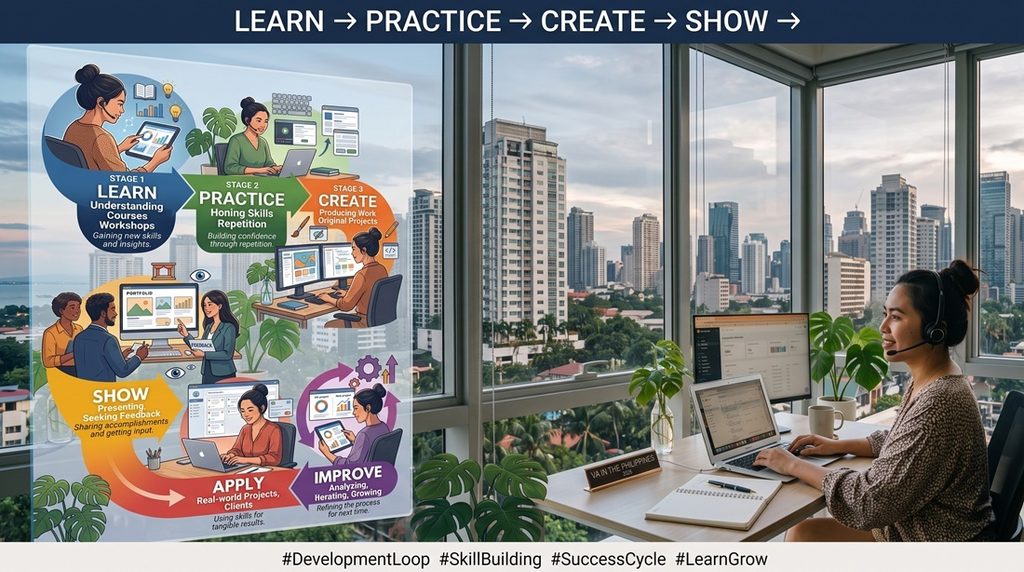
Learning without practice isn’t enough.
Practice without applying eventually becomes another form of procrastination.
Certificates can support your profile.
They can show that you completed training.
But a certificate doesn’t automatically prove that you can do the work.
If I had to choose between:
Applicant A: 20 certificates but no work samples.
and
Applicant B: three relevant portfolio samples showing exactly how they would perform the job.
Applicant B would immediately give me more information about their ability.
So collect certificates when they genuinely help you learn.
But build proof of work too.
1. Trying to Learn Everything
You don’t need to become a graphic designer, bookkeeper, copywriter, video editor, social media manager, SEO specialist, and executive assistant at the same time.
Choose a starting point.
2. Applying to Everything
Sending 100 generic applications isn’t automatically better than sending 15 relevant ones.
Understand the role first.
3. Claiming Skills They Don’t Have
Clients eventually find out.
It’s better to say you’re learning than pretend you’re an expert.
4. Focusing Only on Tools
Tools change.
Businesses switch software.
The underlying skills matter more.
Knowing how to manage a project is more important than knowing only one project-management app.
5. Disappearing When There Is a Problem
Clients don’t expect perfection.
They do expect communication.
If you’re delayed, tell them.
If something isn’t clear, ask.
If you make a mistake, explain it and fix it.
6. Copying Other VAs’ Profiles
It’s tempting.
You find a successful VA profile and copy the wording.
But now you sound exactly like everyone else.
Your profile should reflect what you can actually do.
Being Filipino alone isn’t your competitive advantage.
Being the cheapest person available isn’t either.
Long-term value comes from things like:
- reliability
- communication
- organization
- initiative
- adaptability
- attention to detail
- problem-solving
- technical skills
- professionalism
- trust
A strong VA eventually reaches the point where the client thinks:
“I don’t have to worry about this anymore because my VA handles it.”
That’s a powerful position to be in.
No.
There’s nothing wrong with starting as a general VA.
In fact, general work can help you discover what you’re actually good at.
Maybe you start handling email, spreadsheets, research, and social media.
After several months, you realize you enjoy organizing systems and operations.
That might eventually lead you toward executive assistance or project management.
Or perhaps you discover you love e-commerce.
You could specialize there.
Your first role is a starting point, not a lifetime contract.
I
f you’re completely new, start with skills that appear across many types of businesses:
- Professional communication
- Google Workspace
- Online research
- Spreadsheet management
- Email organization
- Calendar management
- Basic AI literacy
- Task and time management
Then add specialized skills based on the clients you want to serve.
AI will probably change what virtual assistants do.
It already has.
Some tasks that previously took an hour may now take ten minutes with the right AI-assisted workflow.
But businesses don’t simply need someone who can type prompts.
They still need people who can:
- understand context
- communicate with customers
- organize workflows
- make judgment calls
- verify information
- coordinate people
- follow through
- protect confidential data
- take responsibility for results
So don’t compete against AI by pretending it doesn’t exist.
Learn how to use it responsibly.
The better question isn’t:
“Will AI replace VAs?”
It’s:
“How can I become the VA who knows how to work effectively with AI?”
If all of this still feels overwhelming, remember this:
You don’t need 20 services.
You don’t need 50 certificates.
You don’t need a perfect portfolio.
You don’t need to know every VA software.
Start here:
1. Pick one direction.
General VA is perfectly fine.
2. Choose two or three services.
Something you can actually perform.
3. Learn the necessary tools.
Practice instead of just watching.
4. Create three sample projects.
Give clients evidence.
5. Build a simple professional profile.
Tell people exactly what you can help with.
6. Start applying.
Don’t wait forever.
7. Improve based on real feedback.
Every application, interview, and client conversation teaches you something.
That’s how your VA career grows.
Can I become a virtual assistant without experience?
Yes. Start with transferable skills, learn a small number of useful tools, create sample projects, and apply for entry-level opportunities. Be honest about your experience.
Do I need a college degree to become a virtual assistant?
Not every VA job requires one. Requirements vary depending on the employer, client, industry, and responsibilities. Skills and demonstrated ability can be especially important in freelance work.
Can students become virtual assistants?
Some students take on freelance or part-time remote work when their age, schedule, skills, and the platform or client’s requirements allow it.
Do I need perfect English?
No. Clear professional communication is more important than sounding like a native speaker.
What equipment do I need?
A reliable computer, internet connection, microphone or headset, and a suitable work environment are common basic requirements. Specific clients may require additional equipment.
Can I work as a VA using only a phone?
Some isolated tasks may be possible on a smartphone, but a computer is generally much more practical for professional VA work involving documents, spreadsheets, multiple browser tabs, software, meetings, and file management.
Is general VA work good for beginners?
It can be. General administrative work lets beginners develop experience across several business functions before deciding whether to specialize.
Should I take a VA course first?
Only if the course teaches something you actually need. You can also learn many foundational skills through free resources and hands-on practice.
Where can Filipino VAs find clients?
Potential sources include remote-job platforms, freelance marketplaces, professional networking sites, referrals, online communities, and direct outreach.
What is the first thing I should do today?
Write down three things:
What am I already good at?
What business tasks can those skills solve?
What two or three services could I confidently offer after some focused practice?
That’s your starting point.
There is a lot of noise around becoming a virtual assistant.
One person tells you that you need ten certificates.
Someone else says you need an expensive course.
Another tells you to learn five different software platforms before applying.
Another says you have to choose a high-paying niche immediately.
You don’t have to make it that complicated.
Start with what you know.
Improve what you don’t know.
Practice.
Create proof of your ability.
Apply.
Make mistakes.
Learn.
Keep going.
Your first goal isn’t to become the world’s best virtual assistant.
Your first goal is much simpler:
Become useful enough that one client trusts you with one problem.
Solve that problem well.
Then solve another.
That’s how a real VA career starts.
About The Filipino VA Guide
The Filipino VA Guide is a practical resource for Filipinos who want to start and grow a career in virtual assistance and remote work.
Here you’ll find straightforward guides about VA skills, finding clients, portfolios, remote-work tools, AI, client communication, productivity, and building a sustainable online career from the Philippines.
No overnight-success promises.
Just practical information you can actually use.